
CrewCard USA · Connected Workforce Operations
Workforce Management Software Built for the Demands of Staffing
Fill shifts, coordinate workers across multiple job sites and keep scheduling, timesheets, payroll preparation and client invoicing connected. Spend less time chasing updates and more time keeping jobs staffed.
Free, personalized 30-minute walkthrough · No obligation
 19+ years
Workforce operations experience
 3,864
Active workers managed
 16,083
Shifts managed in 2026
 84,233+
Worker hours managed in 2026
Operational figures shown reflect CrewCard-related workforce operations, not necessarily U.S.-only customer activity.
Made for Real Staffing Operations
The Hard Part Isn't Just Building a Schedule
It's filling last-minute openings, checking who can work, keeping everyone updated and getting approved hours ready for payroll and client billing. CrewCard brings those steps into one connected workflow.
Need to fill a shift quickly?
Find available workers who match the job requirements and send shift offers without starting from scratch.
Managing several jobs and sites?
Keep shift assignments, worker details and schedule changes visible to your operations team.
Still reconciling hours manually?
Review digital timesheets and use approved shift information for payroll preparation and invoicing.
One Connected Workflow
From Filling Shifts to Getting Paid
Instead of switching between disconnected tools, follow each job from recruitment and scheduling through approved hours and client invoices.
 Recruit
 Onboard
 Schedule
 Track Time
 Prepare Payroll
 Invoice
Explore the Platform
Everything Your Staffing Team Needs, Connected
Start with the day-to-day work that matters most, then explore how CrewCard connects the rest of your staffing operation.

Recruiting & Onboarding
Move applicants through review, collect onboarding documents and activate approved workers for scheduling.
Explore recruiting →
Employee Scheduling
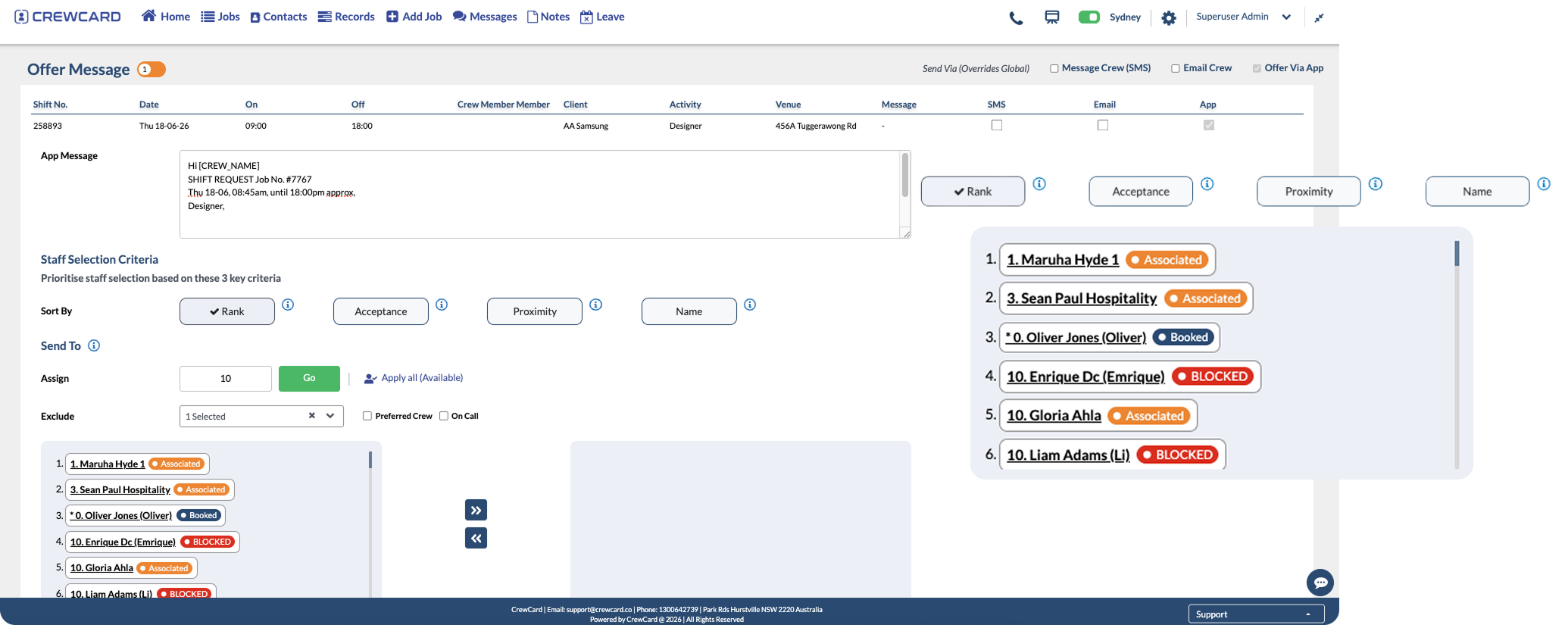
Match workers to shift requirements, send offers and see who is assigned across jobs and sites.
Explore scheduling →
GPS Timesheets
Record check-ins, check-outs and hours worked, then review timesheets before approval.
Explore timesheets →
Certification Tracking
Keep worker licenses and certification expiration dates visible when allocating work.
Explore compliance →
Payroll Workflow
Turn approved hours and adjustments into records ready for your payroll workflow.
Explore payroll →
Client Invoicing
Use approved shifts and timesheet information to prepare client invoices.
Explore invoicing →See CrewCard in Action
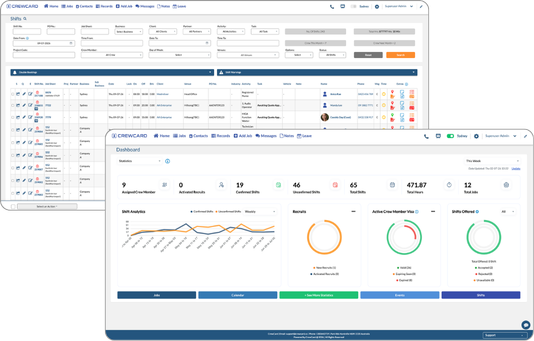
When a New Shift Comes In, Know Where to Start
Review who is available, identify workers who meet job requirements and manage offers and assignments in one place. Help your schedulers respond to late changes without losing sight of other jobs.
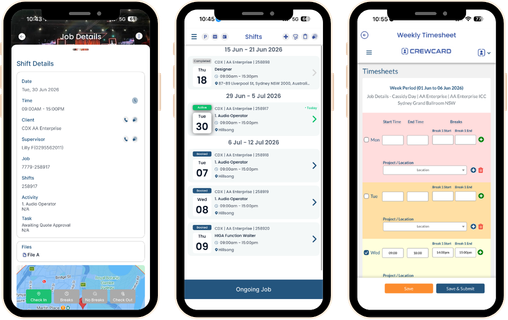
CrewCard Mobile App
Keep Workers Connected in the Field
Give workers a place to view job details, respond to work and record time from their phones. Keep your office and field teams working from the same shift information.
U.S. Employee Onboarding
Form I-9, Connected to Worker Records
Track Form I-9 steps, employer review and administrative approval alongside your worker onboarding records. Your team remains responsible for meeting applicable I-9 requirements.
Who CrewCard Helps
For Teams Working Across Shifts and Sites
For staffing agencies and businesses coordinating temporary, hourly and field-based teams across multiple sites.
Implementation Support
Switching Systems? Start With a Plan.
See how CrewCard could fit your existing processes before you commit to changing them. Discuss configuration, data imports, testing and rollout requirements with our team.

Configure
Map your workflows and configure the relevant settings.

Test
Review scheduling, timesheets and other priority tasks.

Prepare
Plan imports, access and team onboarding.

Go Live
Roll out CrewCard with an agreed implementation approach.
Integrations
Keep the Tools You Already Use
Review supported connections and discuss which existing systems can stay in your workflow. Confirm the exact integration method with our team.



Clearer Conversations About Cost
Find Out What CrewCard Would Look Like for Your Team
Every staffing operation is different. In your demo, ask which features fit your workflow, what setup could involve and how pricing would apply to your business.
A Free, Personalized Walkthrough
See What CrewCard Could Change for Your Staffing Business
Bring your current scheduling, onboarding or timesheet process. We'll focus your 30-minute demo on the workflows that matter to your team.
Free to explore · No obligation · Tailored to your business