
Workforce Management App for Shift-Based Teams
CrewCard's workforce management app gives workers mobile access to shifts, availability, job details, reminders, GPS check-ins, check-outs and timesheets.
Keep mobile workforce activity connected to the same platform your operations team uses for scheduling and workforce management.
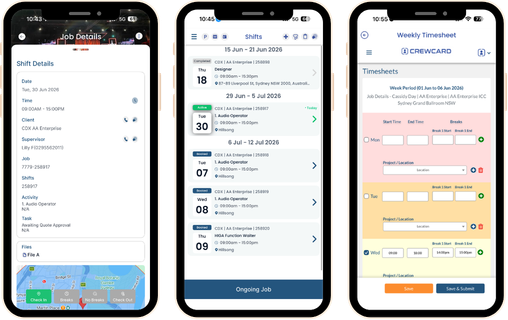
Workforce Management App for Daily Shift Activity
Give workers one mobile place to view their work, update availability and complete shift-related actions.
Mobile activity stays connected to CrewCard so office teams have clearer workforce records without relying on repeated calls or messages.
View Shifts
Workers can view upcoming shifts, start times, locations, roles and job details from their phone.
GPS Check In & Out
Let workers check in and out from their phone with location-backed attendance records.
Manage Availability
Workers can update availability so schedulers have clearer information when assigning shifts.
Submit Timesheets
Submit timesheet information through the app for review and approval.
Receive Shift Reminders
Keep workers informed with reminders, shift updates and job-related notifications.
Access Job Details
Give workers access to venue information, instructions and shift requirements before they start work.
From Shift Assignment to Submitted Timesheet
The CrewCard mobile app keeps workers connected throughout the shift lifecycle, from receiving work through attendance and timesheet submission.
Shift activity stays linked to scheduling, worker records and approval workflows for operations teams.
Receive Shift
View Job Details
Check In
Check Out
Submit Timesheet
Mobile Workforce Management for Shift-Based Teams
CrewCard supports casual, temporary, mobile and field-based workforces working across changing jobs and locations.
Workers stay connected to the information and actions they need without depending on the office for every shift update.
Staffing Agencies
Keep temporary and casual workers connected to shifts, availability and job information.
Events & Hospitality
Give workers mobile access to changing venues, shift details and attendance actions.
Healthcare & Support
Help mobile workers keep track of assignments, locations and shift activity.
Security & Cleaning
Connect workers to shift and site information across multiple client locations.
Construction & Field Teams
Give field workers access to jobs, locations, instructions and mobile check-in tools.
Warehousing & Logistics
Keep hourly and shift-based workers connected to schedules and job information from their phone.
Connect the Mobile App With Workforce Operations
A workforce management app is more useful when mobile actions stay connected to the rest of your workforce system.
CrewCard connects worker activity with scheduling, timesheets, compliance records and payroll preparation.
Employee Scheduling
Keep worker availability and shift activity connected to employee scheduling .
GPS Timesheets
Use the mobile app with GPS timesheets for check-in, check-out and submitted-hour workflows.
Compliance Records
Keep worker information connected to workforce compliance records and onboarding workflows.
Payroll Workflows
Keep submitted and approved timesheets connected to payroll preparation .
Worker Profiles
Keep mobile shift activity connected to each worker's CrewCard record.
Job Information
Give workers access to the shift, venue and job details needed while away from the office.
Keep Your Workforce Connected From Their Phone
See how CrewCard gives workers mobile access to shifts, availability, job details, GPS check-ins and timesheets while keeping activity connected to workforce operations.
Request Demo