
Employee Time Tracking Software with GPS Timesheets
CrewCard employee time tracking software connects GPS-backed check-ins, check-outs, digital timesheets and supervisor approvals in one workforce workflow.
Turn completed shifts into approved, payroll-ready hours while keeping time records connected to scheduling and workforce operations.
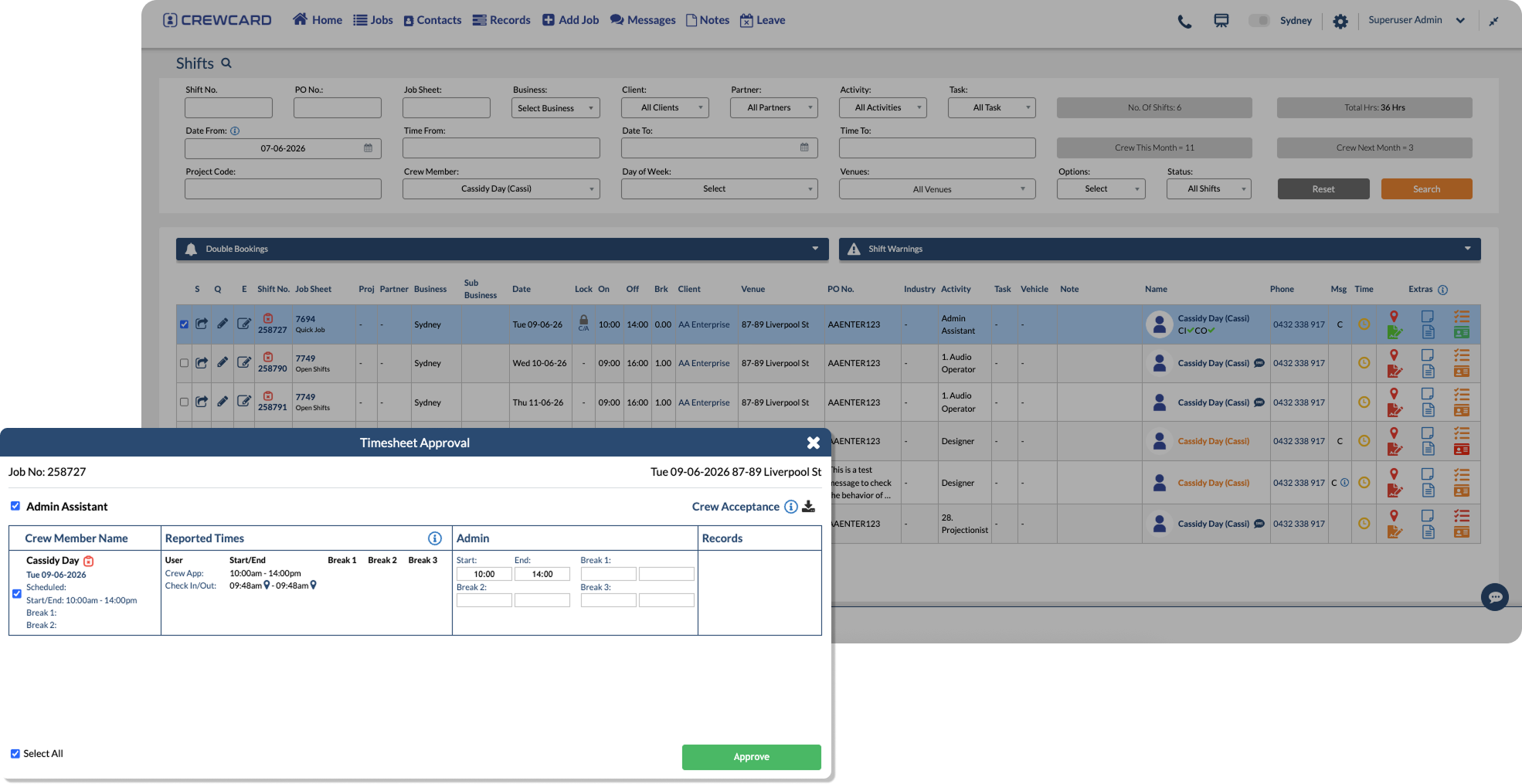
Employee Time Tracking Software for Accurate Timesheets
Track check-ins, check-outs, breaks and submitted hours from one connected time and attendance workflow.
Review recorded time before hours are approved for payroll or client invoicing.
GPS Check In & Out
Record check-in and check-out activity with location visibility for clearer attendance records.
Digital Timesheets
Keep shift times, breaks and submitted hours organized in one system.
Supervisor Approvals
Let supervisors or managers review hours before payroll processing.
Clearer Time Records
Use recorded attendance data to help resolve questions about shift times and submitted hours.
Payroll-Ready Hours
Prepare approved timesheet records for payroll with fewer manual checks.
Mobile Time Tracking
Give workers a simple way to check in, check out and submit timesheets from their phone.
From Employee Check-In to Approved Hours
CrewCard keeps time tracking connected from the beginning of the shift through timesheet submission and supervisor approval.
Operations, payroll and admin teams can review attendance and approved-hour records without rebuilding the same shift information.
Worker Checks In
Track Attendance
Submit Timesheet
Supervisor Review
Approve Hours
GPS Time Tracking for Shift-Based and Mobile Teams
CrewCard is designed for businesses tracking workers across changing jobs, sites, clients and shifts.
Keep timesheet records connected to scheduling, payroll workflows and client invoicing.
Staffing Agencies
Track worker attendance and approved hours across clients and job locations.
Events & Hospitality
Keep attendance records connected to event shifts, venues and crew hours.
Healthcare & Support
Track time across changing shifts, locations and worker assignments.
Security & Cleaning
Record time and attendance for workers operating across multiple client sites.
Construction & Field Teams
Capture check-ins, check-outs and worked hours across job sites.
Warehousing & Logistics
Manage timesheets and approved hours across hourly and shift-based operations.
Connect Employee Time Tracking With Workforce Operations
Time tracking is more useful when attendance records remain connected to the jobs and shifts that created them.
CrewCard keeps approved time connected to scheduling, payroll preparation and client invoicing workflows.
Mobile App
Let workers record shift activity through the CrewCard mobile app .
Employee Scheduling
Keep attendance records connected to employee scheduling and shift details.
Payroll Workflows
Move approved hours into payroll workflows .
Client Invoicing
Use approved hours to support client invoicing workflows.
Worker Records
Keep attendance and timesheet information connected to each worker profile.
Supervisor Review
Give supervisors a clear workflow for reviewing and approving submitted hours.
Simplify Employee Time Tracking and Timesheet Approval
See how CrewCard helps your team track attendance, manage GPS timesheets, approve worked hours and prepare payroll-ready records from one connected platform.
Request Demo