
Payroll Automation Software for Payroll-Ready Workforce Data
CrewCard payroll automation software helps businesses turn approved timesheets, worked hours, rates and adjustments into payroll-ready workforce data.
Reduce repeated data entry and move from approved work to payroll preparation with a clearer connected workflow.
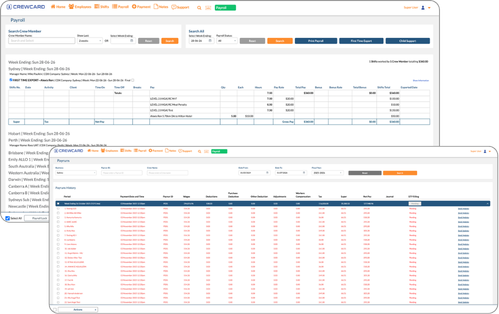
Payroll Automation Software for Approved Workforce Data
Use approved timesheets, worked hours, breaks, rates and adjustments as the starting point for payroll preparation.
CrewCard keeps payroll-ready records connected to the shifts, jobs and worker profiles they came from.
Approved Timesheets
Use reviewed and approved hours as the basis for payroll preparation.
Reduce Manual Entry
Move approved workforce data forward without retyping the same information.
Payroll-Ready Exports
Prepare reviewed workforce data for your payroll system or internal process.
Track Payroll Activity
Keep payroll preparation organised and visible across workforce operations.
Review Adjustments
Check hours, breaks, allowances and adjustments before payroll data is finalised.
Connected Records
Link payroll-ready data back to shifts, jobs, workers and approved timesheets.
From Approved Timesheets to Payroll-Ready Data
CrewCard keeps worked shifts connected to timesheets, approvals, rates and payroll-ready workforce records.
This gives operations, payroll and admin teams a clearer way to move approved work into payroll preparation.
Track Time
Review Hours
Approve Timesheets
Prepare Payroll
Export Data
Payroll Automation for Shift-Based and Mobile Workforces
CrewCard supports businesses managing workers across changing clients, jobs, locations and pay conditions.
Keep payroll-ready records connected to approved timesheets, worker profiles and completed job information.
Staffing Agencies
Prepare payroll-ready data from approved worker hours, rates and client jobs.
Events & Hospitality
Keep payroll preparation connected to event shifts, approved hours and extras.
Healthcare & Support
Review approved workforce records across changing shifts and assignments.
Security & Cleaning
Prepare payroll-ready information for teams working across multiple sites.
Construction & Field Teams
Keep approved hours and payroll records connected to jobs and workers.
Warehousing & Logistics
Review approved hours across hourly and shift-based workforce operations.
Connect Workforce Records With Payroll Preparation
Payroll automation works best when approved data stays connected to the jobs, shifts and worker records behind it.
CrewCard keeps the workflow connected from timesheet approval through payroll preparation and payroll-ready exports.
GPS Timesheets
Use approved records from GPS timesheets before preparing payroll data.
Scheduling Records
Keep payroll preparation connected to scheduling , completed shifts and approved hours.
Compliance Records
Keep worker information connected to workforce compliance records .
Client Invoicing
Connect approved workforce records with client invoicing workflows.
Worker Profiles
Keep hours, rates and payroll-ready information linked to worker records.
Payroll Exports
Prepare reviewed workforce data for your payroll system or processing workflow.
Automate the Path to Payroll-Ready Data
See how CrewCard helps your team turn approved timesheets, hours, rates and adjustments into payroll-ready workforce data with less manual admin.
Request Demo