
Mobile Workforce Management App: 8 Features Shift-Based Teams Need
A mobile workforce management app should do more than show employees a schedule. For staffing agencies and shift-based teams, the most useful apps connect availability, job details, shift reminders, mobile check-ins, timesheets and workforce records so employees and operations teams are working from the same information.
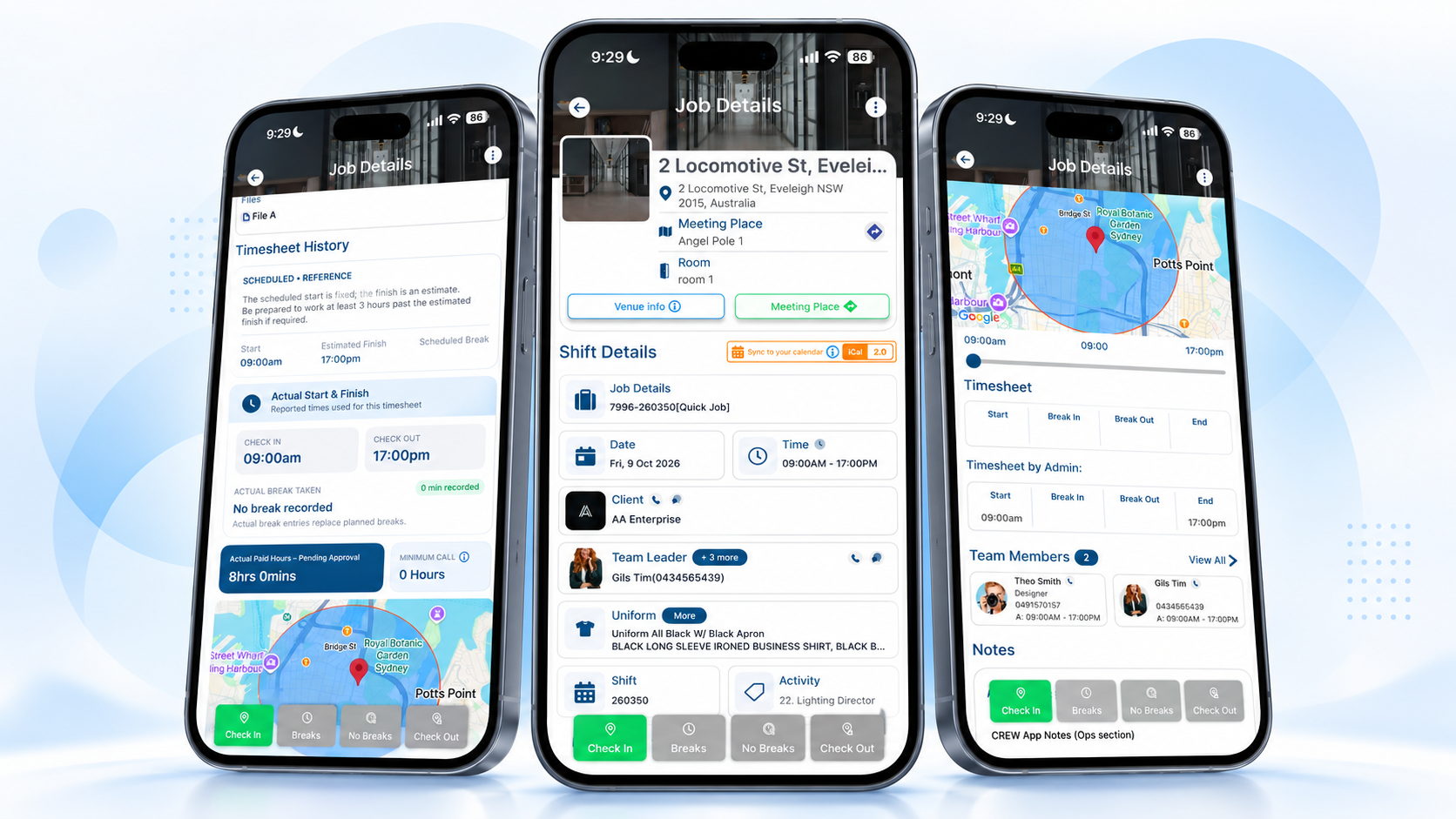
A strong mobile workforce management app should help shift-based employees view work, update availability, receive shift information, check in and out, submit timesheets and stay connected to the same workforce records used by operations. The best feature set depends on how your organization schedules, tracks time and manages workers.
What is a mobile workforce management app?
A mobile workforce management app gives employees who work away from a desk access to the workforce information and actions they need from their phone. That may include schedules, job locations, availability, attendance and timesheets.
For staffing agencies, security teams, event crews, cleaning companies, construction teams and other mobile workforces, the goal is simple: keep field activity connected to office operations. For U.S. staffing businesses, OSHA also emphasizes communication and coordination between staffing agencies and host employers when temporary workers are assigned to client worksites. See OSHA's Protecting Temporary Workers guidance.
If employees still need to call or text the office for basic shift details, availability changes or time records, the app is only solving part of the workflow.
Mobile Workforce Management App: 8 Features to Look For
When comparing a workforce management app, focus on the actions employees need before, during and after a shift—not just the length of the feature list.
Mobile shift schedules
Employees should be able to see upcoming shifts, start times, locations, roles and current assignment details from their phone.
Employee availability
Let workers update availability so schedulers have clearer information before assigning or offering shifts.
Shift reminders & updates
Mobile notifications can help employees stay aware of offers, confirmed shifts and important job changes.
Job & location details
Workers need access to the latest venue, site, reporting and role information before arriving.
GPS check-in & check-out
Mobile attendance tools can create location-backed check-in and check-out records where enabled.
Mobile timesheets
Employees should be able to record and submit shift time without relying on paper forms or separate spreadsheets.
Connected worker records
Mobile shift activity is more useful when it stays connected to worker profiles and relevant workforce records.
Connected office workflow
Scheduling, attendance and submitted hours should feed into the operational workflows that managers review.
Mobile workforce app feature checklist
Use this quick checklist when comparing apps for hourly, temporary or shift-based teams.
| Feature | Why it matters | Priority |
|---|---|---|
| Shift schedule | Employees can see when and where they are working. | Core |
| Availability | Schedulers can use more current worker availability. | Core |
| Shift reminders | Workers are less dependent on manual follow-up. | Core |
| GPS check-in/out | Supports location-backed attendance records where appropriate. | Useful |
| Timesheets | Hours can move into review and approval workflows. | Core |
| Job details | Workers have current site and role information. | Core |
| Workforce records | Mobile activity stays connected to the worker record. | Useful |
1. Start with mobile employee scheduling
The schedule is usually the first thing employees need from a workforce app. A worker should be able to open the app and quickly understand when they are working, where they are going and what role they have been assigned.
For staffing agencies, this matters because workers may move between different clients, job sites and shift times. The mobile view should stay connected to the schedule your operations team manages.
See CrewCard's Employee Scheduling Software for the office-side scheduling workflow.
2. Let employees update availability from their phone
Availability changes quickly in a shift-based workforce. If workers have to message a scheduler every time their availability changes, operations teams spend more time collecting information before they can even start filling shifts.
A mobile workforce app should make availability easy for employees to update and easy for schedulers to review as part of shift assignment decisions.
3. Use mobile shift reminders and job updates
Shift reminders can reduce the amount of manual chasing required before a job. Employees should also be able to access current shift details if the role, location or instructions change.
Reminder
Keep upcoming work visible before the shift starts.

Location
Give workers access to the latest job and reporting details.

Update
Make changed shift information easier to find from the phone.
4. Connect mobile check-ins with attendance records
For workers moving between job sites, a phone can also act as an attendance tool. GPS-enabled check-in and check-out can provide location-backed records when the feature is enabled and used appropriately.
The important point is not GPS on its own. Attendance data becomes more useful when it stays connected to the correct worker and shift.
Learn more about CrewCard's GPS Timesheets and Employee Time Tracking Software.
5. Make timesheet submission part of the mobile workflow
After the shift, employees should not need another system just to submit their hours. Mobile timesheets can keep recorded work closer to the shift that produced it.
Worker completes the shift.
Time information is submitted from the mobile workflow.
Managers review and approve recorded hours.
Approved information can continue into payroll preparation and client invoicing workflows.
6. Keep mobile activity connected to worker records
A scheduling app is useful for showing shifts. A broader workforce management mobile app becomes more valuable when mobile actions stay connected to the employee record and the wider workforce system.
For example, operations may need to review worker information, qualifications or compliance records while deciding who should be offered a particular assignment. Those records do not all need to live on the same screen, but they should not be completely disconnected from the scheduling process.
See CrewCard's Certification Tracking Software for workforce licenses, certifications, documents and expiry dates.
7. Look beyond the app screen to the connected workflow
A mobile app should not create a second version of your workforce operation. Employee activity should flow back into the same system managers use for scheduling, attendance and timesheet review.
If a worker updates availability, accepts a shift, checks in or submits a timesheet, does the operations team see that information in the workflow they already use?
8. Make sure the app fits shift-based work
Some employee apps are built mainly for office communication or task lists. Shift-based teams need a different set of priorities: schedules, job locations, changing availability, time records and clear status throughout the shift lifecycle.
A good shift management app should support the way your workforce actually moves between assignments rather than forcing a field team into an office-style workflow.
Who benefits from a mobile workforce management app?
Mobile workforce tools are most useful when employees work across changing shifts, client sites or locations rather than from one fixed desk. OSHA uses the term mobile workforce for work characterized by employees moving between work projects or sites, which closely reflects the operating model of many field-based teams.

Staffing agencies
Keep temporary workers connected to shifts, availability and job details.
Events & hospitality
Support changing venues, schedules and mobile attendance.
Field teams
Give mobile employees access to job and shift information away from the office.
Security & cleaning
Connect employees working across multiple client sites.

Construction
Keep workers connected to job locations, schedules and attendance actions.
Logistics
Support hourly and mobile workers moving between jobs and facilities.
Workforce management app vs. employee scheduling app
An employee scheduling app primarily helps teams create, publish and view schedules. A broader workforce management app can connect that schedule with other worker actions such as availability, attendance, timesheets and workforce records.
If scheduling is your only problem, a standalone scheduling app may be enough. If your team regularly moves from shift assignment to attendance, approval and payroll preparation, a more connected workflow may reduce repeated data entry and manual follow-up.
When do texts and spreadsheets stop being enough?
Small teams can manage schedules with shared calendars, spreadsheets and group messages. The process becomes harder when the workforce or number of job sites grows.
- Employees regularly ask where or when they are working.
- Availability lives in messages instead of the schedule.
- Shift changes are sent through several different channels.
- Check-in records and timesheets are stored separately from shifts.
- Managers spend time matching submitted hours back to the correct job.
- Workers rely on old screenshots instead of current job information.
Those are signs that a connected mobile workforce management app may be more useful than another standalone tool.
How CrewCard supports mobile workforce management
CrewCard's Workforce Management App gives workers mobile access to shifts, availability, job details, reminders, GPS check-ins, check-outs and timesheets.
Mobile activity stays connected to CrewCard's scheduling and workforce workflows so office teams have clearer visibility without relying on repeated calls, paper time cards or disconnected spreadsheets.
The goal is one connected shift lifecycle: receive work, view the job, check in, check out and submit time while the operations team continues working from the same workforce platform.
Frequently asked questions
What is a mobile workforce management app?
It is a mobile tool that helps employees and managers handle workforce activity away from a desk, such as schedules, availability, job information, attendance and timesheets.
What features should a workforce management app include?
For shift-based teams, a mobile workforce management app should include mobile schedules, employee availability, shift reminders, job details, check-in and check-out, timesheets and connections to wider workforce records.
Can a mobile workforce app support shift reminders and check-ins?
Yes. Depending on the platform, mobile workforce apps can send shift notifications and support check-in and check-out workflows. CrewCard supports shift reminders plus GPS-enabled check-in and check-out.
Is a workforce management app different from a scheduling app?
A scheduling app focuses mainly on shifts and schedules. Workforce management apps can connect scheduling with other processes such as availability, attendance, timesheets and worker records.
Is CrewCard available on iOS and Android?
Yes. CrewCard's mobile app is available for both iOS and Android devices.
Final thoughts
The right mobile workforce management app should make a shift easier to manage from both sides: employees can see and complete the actions they need, while operations teams receive clearer, more connected workforce information.
When comparing a mobile workforce management app, start with the real shift lifecycle—availability, assignment, job details, attendance and timesheets—and choose a system that keeps those steps connected.
Keep every shift connected from the worker's phone to the operations team
Give employees mobile access to shifts, availability, job details, check-ins and timesheets while keeping workforce activity connected to CrewCard.