
Time Card vs Timesheet: 7 Essential Differences for Better Staffing
The difference between a time card vs timesheet can sound minor, but it matters when a staffing agency needs to track hours across workers, clients and job sites. A time card usually captures when someone starts and stops work. A timesheet usually organizes those hours for review, approval, payroll preparation and sometimes client billing.
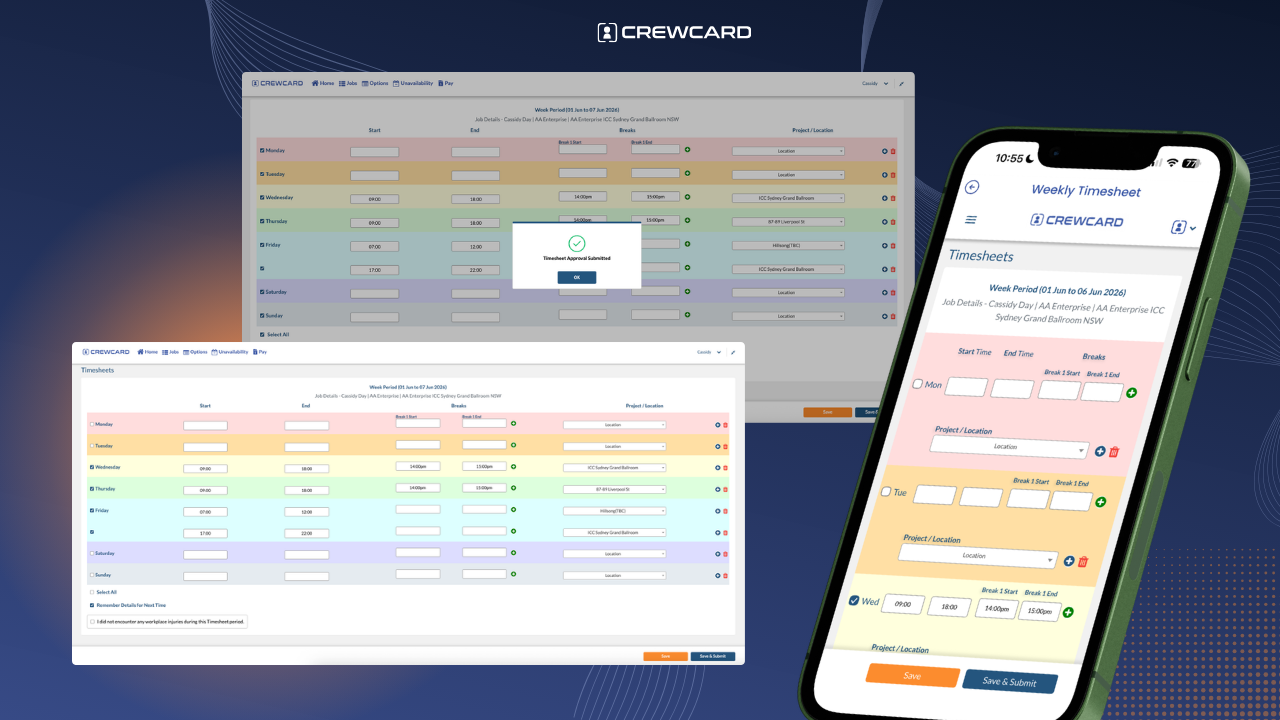
CrewCard Weekly Timesheets: workers can record shift hours, breaks and job details in one connected timesheet workflow for review and approval.
Time card vs timesheet: a time card generally records an employee's clock-in, clock-out and worked time, while a timesheet usually presents those hours in a format managers can review and approve. A time clock is the tool or method used to capture the time in the first place. In modern staffing software, these steps are often connected in one digital workflow.
Time Card vs Timesheet: What's the Difference?
In U.S. workplaces, time card and timesheet are sometimes used interchangeably. Software vendors, employers and employees may use the terms differently, so there is no single definition that every system follows.
For staffing operations, a practical distinction is more useful:
Time card
A record of when an employee worked, often built from punches, check-ins or start and finish times.
Timesheet
A structured record of worked hours that can include breaks, jobs, clients, approvals and pay-period information.

Time clock
The device, kiosk, app or system employees use to record when work starts and ends.
The U.S. Department of Labor does not require employers to use one specific timekeeping format. Covered employers must keep accurate records of hours worked, but the records do not have to take a particular form and a time clock is not mandatory. See the Department of Labor's FLSA recordkeeping guidance.
Time Card vs Timesheet vs Time Clock
The easiest way to understand the three terms is to look at the role each one plays in an employee time tracking workflow.
| Term | What it usually means | Staffing use | Typical role |
|---|---|---|---|
| Time clock | The tool used to record start and finish activity. | Mobile app, kiosk or job-site clock-in. | Capture |
| Time card | A record of an employee's punches or worked time. | Shows when a worker started, stopped or recorded time. | Record |
| Timesheet | A structured summary of worked hours and related details. | Supports manager approval, payroll preparation and client billing. | Approve |
Some software calls a digital time card a timesheet, while other systems use “time card” for punches and “timesheet” for the approved weekly or shift record. Focus on the workflow rather than the label.
What is an employee time card?
In a time card vs timesheet comparison, the time card is the more immediate record of when an employee worked. Historically that might have meant a paper card inserted into a physical punch clock. Today, the same concept can be digital.
A modern time card may contain:
- employee name or ID
- clock-in and clock-out times
- break activity
- date and shift
- job or location
- total recorded hours
For staffing agencies, the time card is useful because it creates a record tied to the individual worker and assignment. But the raw record may still need review before it is ready for payroll or client billing.
What is a timesheet?
In the time card vs timesheet workflow, the timesheet usually takes the underlying time records one step further. Rather than showing only a punch, it organizes worked time into a record that a worker, supervisor or manager can review.
For staffing agencies, a timesheet may include the worker, client, job, shift, start and finish times, breaks, total hours and approval status.
Worked hours are connected to the correct worker and assignment.
Breaks and adjustments can be reviewed before approval.
Managers or supervisors can approve the final time record.
Approved hours can support payroll preparation and client invoicing workflows.
CrewCard's Employee Time Tracking Software connects check-ins, check-outs, breaks, digital timesheets and supervisor approvals in one workforce workflow.
Where does a time clock fit in?
A time clock is the method used to capture the employee's work time. That method can be a physical clock, web portal, mobile app, kiosk or another approved timekeeping process.
The Department of Labor notes that employers may use different timekeeping methods as long as required records are complete and accurate. A particular clocking method is not required under the FLSA. See the Department's hours and recordkeeping overview.
For workers moving between client sites, a mobile check-in can be more practical than a fixed wall-mounted clock because the time record stays connected to the employee's assigned shift.
Why the difference matters for staffing agencies
For staffing agencies, the time card vs timesheet distinction matters because timekeeping is often more complicated than in a business where every employee works at one location. Workers may move between different clients, job sites, shift times and supervisors.
Worker starts the shift
The employee records a check-in or start time for the assigned job.
Time is recorded
The worker's start, finish and break activity creates the underlying time record.
Timesheet is reviewed
Hours are checked against the assignment before approval.
Approved hours move forward
Reviewed time can support payroll preparation and client billing workflows.
This is why a staffing agency usually needs more than a standalone time clock. The agency needs the employee time record connected to the correct client, shift and approval process.
Where GPS time cards and GPS timesheets fit
For field and shift-based work, location can add useful context to a time record. A GPS time card or GPS-backed check-in can help operations see where a worker recorded attendance when the feature is enabled.
That does not automatically make the hours correct or approved. GPS activity still needs to be connected to the correct worker, shift and review process.
CrewCard's GPS Timesheets connect location-backed check-in and check-out activity with submitted hours and timesheet approval.
The most useful setup combines attendance records with shift details, breaks, manager review and approved worked hours.
Should a staffing agency use time cards or timesheets?
For most staffing agencies, time card vs timesheet is not really an either/or choice. The strongest workflow uses the time card concept to capture work activity and the timesheet concept to organize and approve the final hours.
| If your main need is... | Most useful approach |
|---|---|
| Knowing when employees started and finished | Digital time card or time clock data |
| Tracking hours across clients and assignments | Digital timesheets connected to jobs |
| Reviewing breaks and adjustments | Timesheet approval workflow |
| Preparing payroll-ready hours | Approved timesheets |
| Supporting client billing | Approved job and timesheet records |
| Tracking mobile workers across job sites | GPS-backed check-in/out plus timesheets |
What to look for in staffing agency time tracking
When comparing employee time tracking tools, look beyond whether the vendor calls the screen a time card or a timesheet. The workflow matters more.
Shift connection: recorded time should link to the correct job and scheduled shift.
Mobile access: workers should be able to record time without returning to the office.
Break records: start, finish and break activity should be easy to review.
Approval workflow: managers should be able to review hours before they move forward.
Payroll preparation: approved hours should support a cleaner payroll workflow.
Client billing: the same approved shift data should be available for invoicing where appropriate.
How CrewCard connects time cards, timesheets and shifts
CrewCard keeps employee time tracking connected to the shift that created it. Workers can use the mobile app for GPS-backed check-in and check-out, record break activity and submit timesheets for review.
Managers can then review worked hours before approved time continues into payroll preparation and client invoicing workflows.
Explore CrewCard's Employee Time Tracking Software, Workforce Management App and Payroll Software for Staffing Teams.
The goal is one connected record: scheduled shift → attendance → submitted timesheet → approved hours.
Frequently asked questions
What is the difference between a time card and a timesheet?
In a practical staffing workflow, a time card usually records when an employee worked, while a timesheet organizes worked hours for review and approval. The terms may overlap depending on the software or employer.
Is a time clock the same as a time card?
No. A time clock is the tool or method used to capture time. The time card is the resulting employee time record. In digital systems, both functions may appear inside the same app.
Do U.S. employers have to use a time clock?
No. The U.S. Department of Labor states that covered employers must keep required and accurate time records, but those records do not have to be kept in one particular form and employers are not required to use a time clock.
What should staffing agency timesheets include?
A staffing timesheet may include the worker, client or job, date, start and finish times, breaks, total hours and approval status. The exact information needed depends on the employer's workflow and applicable requirements.
Can GPS check-ins replace timesheet approval?
GPS check-in data can provide attendance context, but managers may still need to review the worked hours, breaks, adjustments and assignment information before approving a timesheet.
Final thoughts
The most useful way to think about time card vs timesheet is not as two competing formats. A time card captures or records worked time; a timesheet turns that information into something your staffing team can review, approve and use operationally.
For staffing agencies managing workers across clients and job sites, the stronger setup connects the time clock or mobile check-in with the employee time card, timesheet approval, payroll preparation and client billing workflow.
Connect every shift from check-in to approved hours
Use CrewCard to keep employee time records, GPS-backed attendance and timesheet approvals connected to scheduling and payroll preparation.