
How to Handle Last-Minute Shift Cancellations Without Leaving Jobs Unfilled
A confirmed worker cancels an hour before their shift. The client still needs coverage and your scheduling team needs a replacement. Last-minute shift cancellations are easier to manage when you know who to contact, what to confirm and when to escalate.
This guide gives staffing agencies a practical response plan to find replacement workers, protect client commitments and prevent an urgent cancellation from becoming an unfilled job.
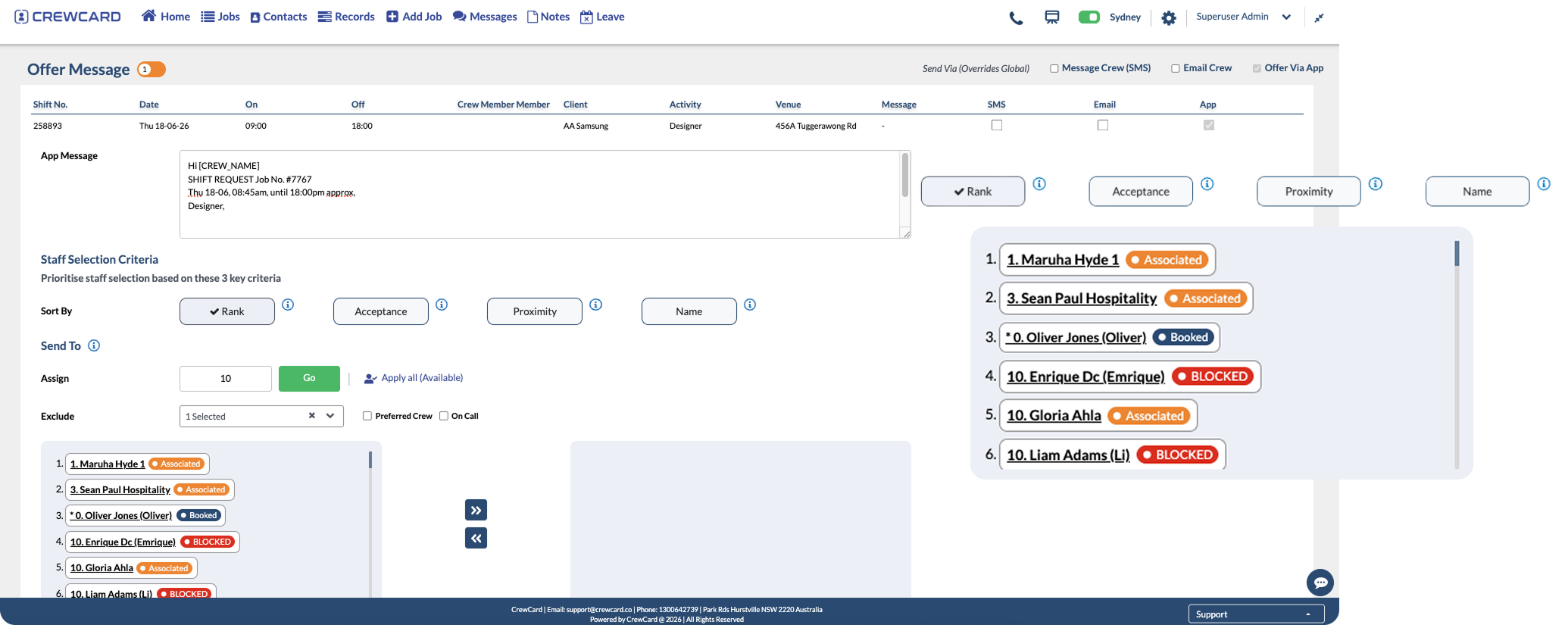
CrewCard Employee Scheduling: Keep job details, open shifts, staff availability and worker assignments connected when schedules change.
To handle last-minute shift cancellations, reopen the vacant shift, check which qualified workers are available, send targeted offers, confirm one replacement and update the client. If nobody accepts before your escalation deadline, activate a backup staffing plan rather than continuing an uncontrolled search.
Why Last-Minute Shift Cancellations Cause Bigger Problems
A cancellation is more than an empty space on the schedule. Staffing agencies are often responsible for supplying a specific number of workers with particular skills at an agreed time.
When a worker cancels 30 minutes before a shift, the scheduler may need to find a replacement, verify qualifications, check travel time, notify the client and update the job assignment.
Coverage Risk
Jobs may start without the required number of qualified workers.
Higher Costs
Replacement searches, travel changes and overtime can increase labor costs.
Client Frustration
Delayed updates can reduce a client's confidence in staffing coverage.
The goal is not to eliminate every unexpected cancellation. Emergencies, illness and transportation problems will still occur. The goal is to reduce the time between receiving the cancellation and making a confirmed coverage decision.
Give every urgent vacancy one owner, one response deadline and one confirmed staffing outcome.
What to Do in the First 30 Minutes After a Cancellation
When dealing with last-minute shift cancellations, the first 30 minutes are critical for identifying the staffing gap and securing replacement coverage.
A clear response plan helps schedulers act without spending the first 20 minutes contacting unsuitable or unavailable workers.
The time windows below are an example process. Adjust them according to the job's start time, travel distance, role requirements and client expectations.
First 5 Minutes: Confirm the Gap
Record the cancellation, identify the affected shift, confirm the minimum staffing requirement and reopen the vacancy.
Minutes 5–10: Build a Shortlist
Find available workers who meet the role, qualification, location and scheduling requirements.
Minutes 10–20: Send Offers
Contact suitable candidates with complete shift details. Track responses and call directly when the lead time is very short.
Minutes 20–30: Confirm or Escalate
Confirm the accepted replacement, close unnecessary offers and update the client. Activate backup coverage if the vacancy remains open.
Sending offers to five workers does not mean the vacancy has been filled. Confirm that one suitable worker has accepted, been assigned and can realistically reach the job.
How to Find Replacement Workers Without Calling Everyone
The fastest way to respond to last-minute shift cancellations is to prioritize qualified workers who are already available and can realistically reach the job on time.
Contacting the largest number of workers is not always the most efficient approach. Instead, identify the people most likely to accept and successfully complete the assignment.
Start with the essential job requirements before sending replacement offers.
Availability: Can the worker attend the full shift, including reasonable travel time?
Skills: Does the worker have the experience and training required for the job?
Compliance: Are required qualifications, licenses and site approvals current?
Location: Can the worker realistically arrive before the shift starts or the agreed revised start time?
Scheduling conflicts: Would the assignment overlap another shift or create an unacceptable fatigue or overtime risk?
Contact workers in the right order
Start with qualified workers who have indicated availability, are reasonably close to the site and have worked similar assignments before.
If they do not respond within the agreed deadline, expand the search to the next suitable group.
CrewCard's Employee Scheduling Software helps teams manage shift assignments, availability and worker responses from a connected scheduling workflow.
Which Replacement Strategy Should You Use?
The best recovery strategy depends on the notice period, travel time and whether the role requires special qualifications.
| Situation | Recommended Action | When to Escalate |
|---|---|---|
| Several hours before the shift | Filter available qualified workers, send targeted offers and track responses. | If no suitable worker accepts before the coverage deadline. |
| Less than one hour before start | Prioritize nearby eligible workers, urgent offers and direct calls. | Immediately if on-time arrival becomes unrealistic. |
| Specialized or certified role | Search only qualified workers and verify site requirements. | Before considering any change to the agreed requirements. |
| Multiple workers cancel | Prioritize essential roles and coordinate each vacancy separately. | When required staffing levels cannot be maintained. |
| No suitable worker accepts | Activate approved backup staffing or discuss revised coverage. | When the recovery deadline is reached. |
Set the escalation deadline early enough to leave time for an alternative. For example, a worker 40 minutes away is unlikely to cover a shift starting in 10 minutes.
Send Shift Offers That Workers Can Answer Quickly
During last-minute shift cancellations, every replacement offer should include the job location, start time, role requirements and a clear response deadline.
Vague replacement requests waste valuable time. Workers should not need several additional messages to understand the job details.
Every urgent offer should include the information required to make a quick, informed decision.
- Shift date and required start time
- Expected finish time
- Job address and meeting point
- Role and essential duties
- Required qualifications or site access
- Applicable pay information
- Response deadline and acceptance instructions
Example: urgent replacement shift message
Urgent shift available: [Role] at [Venue, Address] today, [Start Time–Finish Time]. Required: [Qualifications / Site Requirements]. Please confirm your availability and estimated arrival time by [Response Deadline]. Reply ACCEPT only if you can attend and meet the requirements.
If several workers receive the same offer, confirm one suitable replacement and close the other offers. This helps prevent duplicate assignments or unnecessary travel.
Verify the person's qualifications, availability and travel time before finalizing the assignment.
Keep the Client Updated Before They Have to Ask
When a confirmed worker cancels, do not wait until the scheduled start time to tell the client there may be a staffing problem.
A useful update explains what changed, what is being done and when the next update will be provided.
Example: replacement search in progress
Hi [Client Name], one of the workers assigned to the [Time / Role] shift is no longer available. We're contacting qualified replacement staff and will update you by [Time]. We'll advise immediately if expected coverage changes.
Example: replacement confirmed
Hi [Client Name], replacement coverage has been confirmed for the [Role] shift. The replacement worker is [Name or Approved Identifier] and the current estimated arrival time is [Time]. The assignment details have been updated.
Avoid promising an on-time arrival until the replacement has confirmed they can reach the job.
What If Nobody Accepts the Replacement Shift?
Some last-minute shift cancellations cannot be resolved before the shift starts. Continuing to send offers without a fallback decision can make the problem worse.
Use a clear escalation process with one coordinator responsible for approving the next action.
Check Backup Coverage
Review approved on-call staff, reserve workers or permitted alternative staffing suppliers.
Review Job Priorities
Identify essential functions and whether alternative arrangements can be made safely.
Agree on Client Options
Discuss a revised start time, alternate qualified coverage or an agreed service adjustment.
Record the Outcome
Update shift assignments, client communications and follow-up requirements.
Do not assign an unqualified worker, overlook applicable overtime obligations or reduce safety-critical coverage without appropriate approval.
How to Reduce the Impact of Future Shift Cancellations
Although last-minute shift cancellations cannot always be prevented, staffing agencies can reduce their impact with better availability records, advance confirmations and backup staffing plans.
1. Keep worker availability updated
Encourage workers to update their availability and review these records before assigning shifts.
2. Build qualified backup pools
Maintain backup groups for recurring roles, important client sites and difficult-to-fill assignments.
3. Confirm high-risk shifts early
Consider additional confirmation processes for early starts, remote locations and specialist roles.
4. Make cancellation reporting clear
Workers should understand how to report urgent non-attendance, including who to contact when their shift is about to start.
5. Review recurring cancellation patterns
Track how often vacancies occur, how long replacements take and which assignments are most affected.
For a related attendance problem, review your existing guide on reducing staff no-shows . That topic focuses on preventing missed attendance, while this guide focuses on replacement coverage after a cancellation.
Last-Minute Shift Cancellation Checklist
Use this checklist to manage last-minute shift cancellations consistently across clients, job sites and schedules whenever a confirmed worker cancels close to the start of a shift.
Record the cancellation and identify the vacant shift.
Confirm the role, time, location and essential job requirements.
Assign a coordinator and set a replacement deadline.
Find available and qualified replacement workers.
Send complete shift offers with response deadlines.
Verify acceptance, assignment and estimated arrival time.
Close other offers to prevent duplicate assignments.
Update the client and onsite supervisor.
Activate backup arrangements if no suitable worker accepts.
Verify actual attendance and update job and time records.
Record Actual Hours After an Emergency Replacement
Filling an urgent shift is only part of the process. If the replacement starts later than planned, finishes at a different time or works additional hours, the final time record should reflect what actually happened.
The U.S. Department of Labor explains that covered employers must maintain accurate records of hours worked and wages earned. Employers can use different timekeeping methods, but required records must be complete and accurate.
Read the official U.S. Department of Labor FLSA Recordkeeping Requirements for more information.
This is especially relevant when an urgent replacement changes scheduled hours, creates overtime or requires a timesheet adjustment. State and local requirements may also apply.
How CrewCard Helps Manage Last-Minute Shift Cancellations
Emergency replacement searches become harder when worker availability is stored in one place, shift confirmations are tracked in another and the job schedule must be updated manually.
CrewCard connects staff availability, job requirements, shift offers, worker responses and mobile updates in one workforce scheduling platform.
Find Suitable Workers
Review availability, roles, skills and relevant worker information before assigning.
Offer Open Shifts
Send shift offers and track responses to find accepted assignments.
Keep Records Connected
Link assignments, mobile shift details and attendance to the correct job.
Explore CrewCard's Employee Scheduling Software , Last-Minute Shift Coverage Software and Workforce Management App for related workforce scheduling capabilities.
CrewCard can support replacement coordination, but staffing agencies remain responsible for worker suitability, assignment decisions, client communications and coverage.
Key Takeaway: Replace the Worker, Not the Process
The strongest way to manage last-minute shift cancellations is with a repeatable process that does not depend on one scheduler remembering every available worker.
Confirm the gap → Find qualified available workers → Send offers → Confirm one replacement → Update the client → Verify attendance.
If replacement coverage cannot be secured before the escalation deadline, move to a documented backup plan rather than continuing an uncontrolled search.
Frequently Asked Questions
What should a staffing agency do when a worker cancels at the last minute?
Reopen the shift, identify the required qualifications, search for suitable available workers, send urgent offers and confirm a replacement. Keep the client informed and use a backup plan if the vacancy remains open.
How can I find replacement workers quickly?
Filter your workforce by availability, skills, certifications, location and existing assignments. Contact eligible workers who can realistically reach the job.
Should I offer the canceled shift to every available employee?
Usually, a targeted search is more efficient. Start with suitable workers and expand the search if the first group does not respond.
What if nobody accepts the shift?
Activate approved backup staffing arrangements, contact the client and discuss realistic coverage options. Do not treat an unaccepted offer as confirmation.
Can staffing software reduce last-minute shift cancellations?
Scheduling software cannot prevent every unexpected cancellation, but it can help teams track availability, offer shifts, monitor responses and manage replacement assignments.
How do I avoid double booking replacement workers?
Review existing assignments before confirming a worker. Close unnecessary offers once a replacement is assigned and keep the schedule updated.
Final Thoughts
Last-minute shift cancellations are difficult because they leave very little time to make a safe, suitable and commercially responsible staffing decision.
A clear recovery workflow helps agencies respond faster without losing track of worker suitability, client expectations, confirmations or actual attendance records.
Instead of treating every cancellation as a completely new problem, build a replacement process your team can use consistently.
Don't Let One Cancellation Disrupt Your Entire Schedule
Keep worker availability, open shifts, job requirements and confirmations connected. See how CrewCard helps your team respond to unexpected staffing changes with clearer information and less manual follow-up.