
Mobile App for Staffing Teams and Field Crew
CrewCard gives workers access to shifts, availability, job details, reminders, GPS check in, check out and timesheets from their phone.
Keep crew connected with the same platform your team uses for scheduling, time tracking and workforce operations.
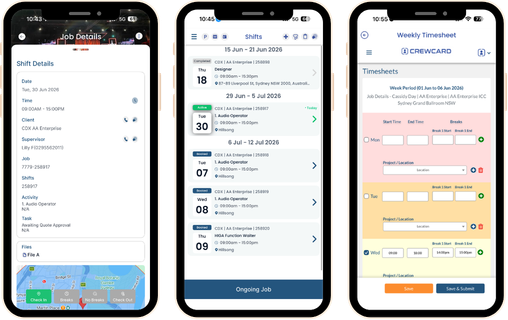
Mobile App for Daily Workforce Activity
A mobile app helps staffing teams keep workers connected before, during and after each shift.
CrewCard gives crew a simple way to view job details, manage availability and submit shift activity from their phone.
This helps operations teams reduce manual follow-up and keep workforce records easier to review.
View Shifts
Crew can view upcoming shifts, job details, start times, locations and role information from the app.
Check In and Out
Allow crew to check in and check out from their phone, helping your team capture attendance records.
Manage Availability
Let crew update their availability so schedulers can make faster and more accurate booking decisions.
Submit Timesheets
Crew can submit timesheet information through the app for review and approval.
Receive Reminders
Keep workers informed with shift reminders, updates and job-related notifications.
Access Job Details
Give crew the information they need, including venue details, instructions and shift requirements.
Best Mobile App Tools for Staffing Operations
Staffing agencies often manage workers across different clients, venues, shifts and locations.
That means crew need quick access to shift details, location information, reminders and timesheet tools.
CrewCard keeps mobile activity connected to scheduling, GPS timesheets and approved workforce records.
This gives schedulers, supervisors and admin teams a clearer view of shift activity.
Receive Shift
View Details
Check In
Check Out
Submit Timesheet
Built for Crew, Supervisors and Staffing Teams
CrewCard is designed for teams that manage casual, temporary, field-based and shift-based workers.
The mobile app keeps workers connected to the information they need to complete each job.
It also helps office teams keep shift activity, availability and timesheet records in one connected system.
Crew Members
View shifts, accept work, check job details, update availability and submit timesheet information.
Supervisors
Review shift activity, worker updates and approved time records linked to jobs and teams.
Staffing Agencies
Keep crew activity connected to smart scheduling, timesheets and workforce records.
GPS Timesheets
Use the app with GPS timesheets to support check in, check out and approved-hour workflows.
Compliance Records
Help workers access onboarding tasks and document workflows connected to compliance software.
Payroll Workflows
Keep submitted timesheets connected to approved hours and payroll workflow preparation.
Why Staffing Teams Use a Mobile App
A mobile app gives workers faster access to the information they need for each shift.
This is useful when teams work across different venues, job sites and client locations.
Instead of relying only on calls, emails or spreadsheets, workers can view job details and submit updates from their phone.
CrewCard supports this process by connecting mobile activity to scheduling, timesheets, compliance records and workforce operations.
This helps staffing teams reduce repeated admin and keep crew records easier to manage.
Ready to Keep Your Crew Connected?
Book a demo and see how CrewCard helps staffing teams manage crew communication, shift activity and timesheets through the mobile app.
Request Demo