
Scheduling Software for Staffing Teams
CrewCard helps staffing teams create jobs, add shifts, manage availability, offer work and confirm crew faster.
Keep scheduling connected to mobile updates, GPS timesheets, payroll workflows and client invoicing.
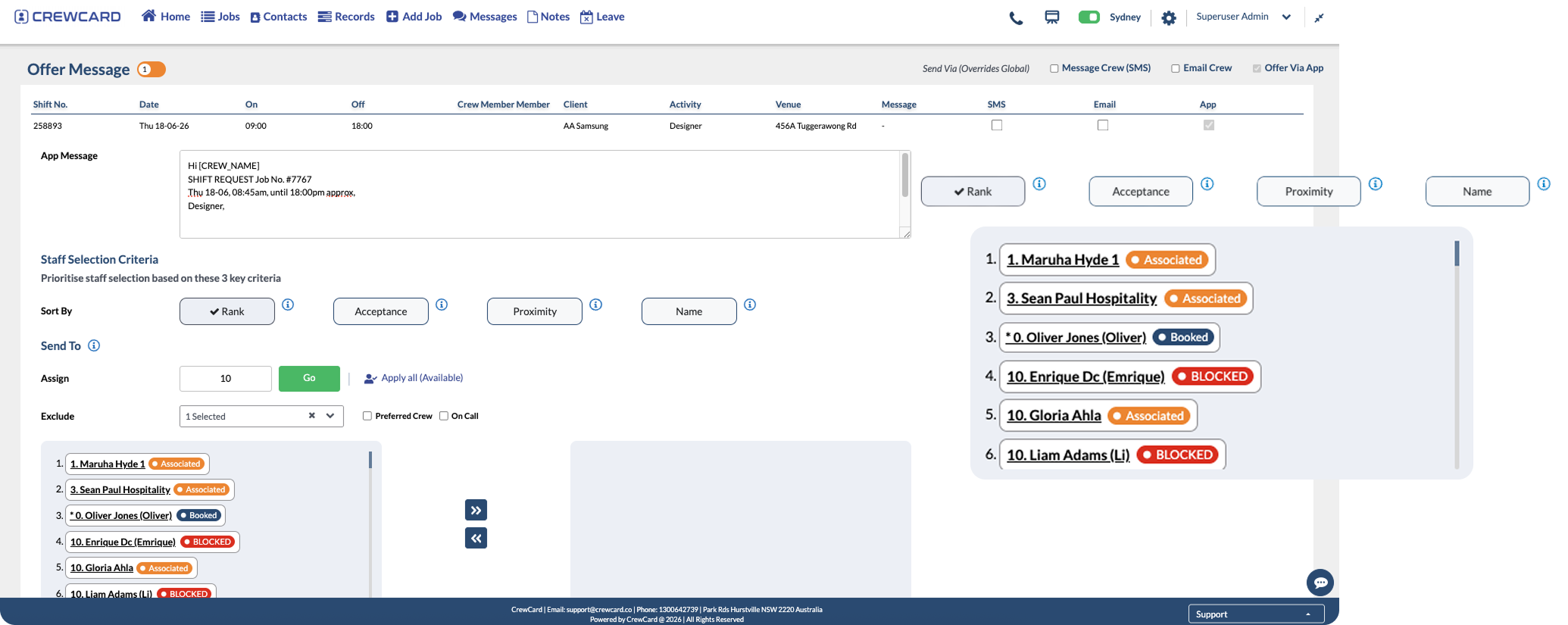
Scheduling Software for Faster Shift Filling
Scheduling software helps staffing agencies fill shifts with less manual back and forth.
CrewCard gives operations teams one place to create jobs, add shifts, offer work and track confirmations.
This helps schedulers review availability and confirm the right crew before each job starts.
Create Jobs Quickly
Build jobs and shifts with key details like client, venue, activity, time and required crew.
Manage Availability
See who is available before offering shifts, helping reduce back and forth communication.
Send Shift Offers
Offer shifts to crew and track responses so your team can confirm workers faster.
Reduce Double Bookings
View scheduling warnings and avoid assigning the same crew member to overlapping shifts.
Match the Right Crew
Assign staff based on skills, activity, location and job requirements.
Keep Teams Updated
Give crew the details they need through the mobile app, including shift times and job information.
Powerful Scheduling Software for Staffing Operations
Staffing agencies often manage workers across different clients, venues, shifts and job requirements.
That means schedulers need a clear way to see availability, job details and crew responses.
CrewCard keeps shift offers, confirmations and job records connected to the wider workforce workflow.
This gives operations teams a cleaner way to move from job request to confirmed crew.
Create Job
Add Shifts
Offer Crew
Confirm Staff
Track Attendance
Built for Staffing, Events and Shift-Based Teams
CrewCard is designed for businesses that schedule workers across multiple clients, jobs, venues and shifts.
Scheduling records can stay connected to crew profiles, timesheets, payroll workflows and client invoicing.
This helps your team reduce repeated admin and keep workforce activity easier to manage.
Staffing Agencies
Create jobs, offer shifts and confirm temporary workers across clients and locations.
Event Staffing Teams
Manage crew availability, shift offers, venue details and confirmed staff for event jobs.
Mobile App
Send shift details and crew updates through the mobile app.
GPS Timesheets
Connect confirmed shifts with GPS timesheets and approved-hour records.
Payroll Workflows
Use approved hours from scheduled jobs in payroll software workflows.
Client Invoicing
Connect completed shifts with invoicing software and client billing workflows.
Why Staffing Teams Use Scheduling Software
Scheduling software gives staffing teams a clearer way to manage fast-moving workforce requirements.
This is useful when teams need to fill multiple jobs across different clients, roles and locations.
Instead of relying only on calls, spreadsheets or email threads, teams can manage shifts in one connected system.
Clearer scheduling workflows help teams review availability, confirm staff and keep job details organised.
CrewCard supports this process by connecting scheduling, mobile updates, GPS timesheets, payroll workflows and invoicing records.
Ready to Schedule Your Workforce Faster?
Book a demo and see how CrewCard helps staffing teams create jobs, offer shifts, confirm crew and track workforce activity from one platform.
Request Demo