
Applicant Tracking Software for Hiring and Onboarding
CrewCard helps businesses organize applicants, candidate profiles, documents and recruitment status from application through to approved worker.
Move successful candidates into onboarding, compliance, scheduling and workforce operations without re-entering the same information across separate systems.
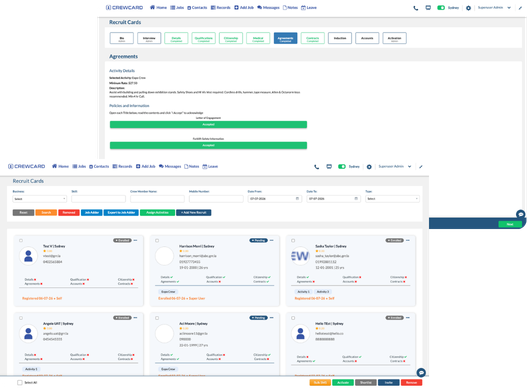
Applicant Tracking Software for Candidate Management
Keep applicant records, candidate details, documents and hiring progress organized in one place.
Give recruiting, HR and operations teams a clearer view of where each candidate sits in the hiring process.
Once approved, candidate information can continue into onboarding and active workforce workflows instead of being entered again.
Track Applicants
Keep applications and candidate records together so your team can review hiring activity more easily.
Centralize Candidate Profiles
Store key candidate details in one profile instead of spreading information across inboxes, files and spreadsheets.
Review Candidate Documents
Review uploaded information and required documents before a candidate moves further through the hiring process.
Track Hiring Status
See which applicants are still being reviewed, require action or are ready to move forward.
Approve New Workers
Move successful candidates into your active workforce when recruitment and onboarding requirements are complete.
Connect Onboarding
Keep hiring information connected to onboarding documents, compliance records and workforce setup.
Move Candidates From Application to Workforce Readiness
Hiring teams need more than a list of names—they need a clear view of candidate progress and outstanding information.
CrewCard connects applicant tracking with onboarding and workforce records so approved candidates can move into operations with less duplicated admin.
Recruitment information stays connected as the worker moves from candidate to active workforce member.
Receive Application
Review Candidate
Collect Documents
Approve Candidate
Onboard Worker
Applicant Tracking for Shift-Based and Field Workforces
CrewCard is designed for businesses that recruit temporary, hourly, mobile, field-based and shift-based workers.
Keep candidate information connected to onboarding, compliance and the workforce processes that begin after hiring.
This is particularly useful for businesses hiring frequently across changing roles, locations and job requirements.
Staffing Agencies
Track applicants and approved workers across multiple clients, roles and job locations.
Events & Hospitality
Manage candidate records for high-volume, seasonal and shift-based hiring requirements.
Healthcare & Support
Keep applicant information and onboarding records easier to review before workers begin assignments.
Security & Cleaning
Manage applicants for mobile and site-based workforces across multiple locations and client sites.
Construction & Field Teams
Track candidate details before workers move into field roles, compliance checks and scheduling.
Warehousing & Logistics
Organize applicant records when hiring hourly and shift-based workers across changing operational demand.
Connect Applicant Tracking With the Rest of Workforce Management
Hiring is only the beginning. Once a candidate is approved, their information should continue into the systems used to manage work.
CrewCard connects recruiting with onboarding, compliance, scheduling and mobile workforce workflows.
This reduces the need to recreate worker records after the hiring process is complete.
Compliance Records
Connect approved workers with workforce compliance software and required records.
Form I-9 Workflows
Move eligible new hires into Form I-9 workflows as part of onboarding.
Workforce Scheduling
Make approved workers available for workforce scheduling once onboarding requirements are complete.
Mobile Workforce App
Give active workers access to shifts, availability and job information through the CrewCard mobile app.
Worker Records
Keep candidate information connected as the applicant becomes an active worker in your workforce database.
Workforce Operations
Connect hiring information with the scheduling, time and workforce workflows your team uses every day.
Why Businesses Use Applicant Tracking Software
Applicant tracking software gives hiring teams one place to organize candidate records and monitor recruitment progress.
It becomes especially useful when businesses are reviewing applicants across multiple roles, locations or hiring campaigns.
Instead of relying on spreadsheets, inboxes and disconnected files, teams can keep candidate information easier to find, review and move forward.
CrewCard extends that workflow beyond hiring by connecting approved candidates with onboarding and workforce operations.
Ready to Simplify Applicant Tracking and Onboarding?
Book a demo and see how CrewCard helps your team track applicants, organize candidate records and move approved workers into onboarding and workforce operations.
Request Demo