
Invoicing Software for Workforce Billing
CrewCard invoicing software helps businesses create client invoices from approved shifts, timesheets, rates and extras.
Keep client billing connected to scheduling, worked hours and workforce records with less repeated data entry.
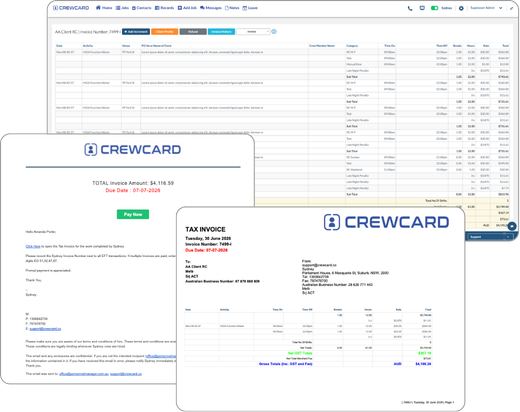
Invoicing Software for Approved Workforce Records
Turn approved shifts, timesheets, rates and extras into client billing without rebuilding the same information manually.
Review billing details before invoices are created and sent to clients.
Create Invoices Faster
Generate invoices from approved shift and timesheet records.
Reduce Billing Errors
Use connected workforce data to reduce retyping and missed hours.
Client Billing Visibility
Review client charges, job details and invoice status in one workflow.
Manage Adjustments
Review rates, hours, deductions and billing adjustments before invoicing.
Send Client Invoices
Prepare and send invoices from the same platform used to manage workforce activity.
Connected Billing Records
Link invoices back to jobs, shifts, worked hours and client records.
From Completed Work to Client Invoice
CrewCard keeps completed shifts connected to approved hours, client rates, job extras and invoice preparation.
Operations and accounts teams can move from approved workforce records to client billing without rebuilding the same job data.
Complete Shift
Approve Hours
Review Charges
Create Invoice
Send to Client
Client Invoicing for Shift-Based and Service Businesses
CrewCard is built for businesses billing clients from completed jobs, worked hours, rates and workforce activity.
Keep invoices connected to the jobs and records behind each charge.
Staffing Agencies
Create client invoices from approved worker hours, rates and job records.
Events & Hospitality
Bill clients from completed shifts, crew hours and approved extras.
Healthcare & Support
Keep client billing connected to approved shifts and service records.
Security & Cleaning
Prepare invoices for recurring and completed work across client sites.
Construction & Field Teams
Keep billing connected to jobs, worked hours, rates and approved extras.
Warehousing & Logistics
Create client billing records from approved hourly and shift-based work.
Connect Invoicing With Workforce Operations
Client billing is easier when invoice data stays connected to the jobs, shifts and approved hours behind each charge.
CrewCard connects invoicing with timesheets, scheduling, payroll preparation and client records.
Timesheet Approvals
Use approved records from GPS timesheets before creating client invoices.
Scheduling Records
Keep billing connected to scheduling , completed shifts and job details.
Payroll Workflows
Keep client billing aligned with approved workforce records and payroll preparation .
Client Records
Keep invoices connected to client accounts, jobs and workforce activity.
Approved Rates
Review rates, worked hours and approved extras before invoices are sent.
Invoice History
Keep billing records easier to review alongside related job and client information.
Turn Approved Work Into Client Invoices
See how CrewCard helps your team create invoices from approved shifts, timesheets, rates and extras while keeping billing connected to workforce operations.
Request Demo