
What Is Workforce Management and How Does It Help Businesses?
Workforce management is the process of organising people, schedules, time, attendance and day-to-day workforce operations. Learn what it includes, why businesses use it and how connected systems can reduce manual administration.
What is workforce management?
Workforce management is the process businesses use to organise employees and workers across everyday operations. It can include scheduling, availability, attendance, timesheets, onboarding, communication, compliance, payroll preparation and reporting.
In simple terms, if you are asking what is workforce management, it is the way a business coordinates its people and the operational processes around when, where and how work is completed.
The goal is to make sure the right people are available for the right work while giving managers clearer visibility over workforce activity, hours and operational requirements.
Why does workforce management matter?
Managing a small team can often start with spreadsheets, messages and manual rosters. As the workforce grows, those processes can become harder to coordinate and easier to lose track of.
A clear workforce management process helps managers understand who is available, who is scheduled, whether workers are ready for the job, which shifts have been completed and which hours still need approval.
- Improve visibility over workers, shifts and availability
- Reduce repeated admin and duplicated data entry
- Keep workforce records easier to review
- Support clearer timesheet and payroll workflows
- Improve communication across teams and locations
What does workforce management include?
Workforce management can cover several connected parts of the employee or worker journey, from joining the business through to completing shifts and approving hours.
Scheduling
Plan shifts, assign workers to jobs and manage schedule changes with clearer visibility.
Availability & Attendance
See when workers are available and track check-ins, check-outs and attendance activity.
Timesheets
Review worked hours and approve timesheets before payroll or client invoicing.
Onboarding & Records
Keep worker details, forms, documents and onboarding progress organised in one place.
Communication
Share shift details, reminders and updates with workers, supervisors or selected teams.
Payroll Preparation
Use approved time and shift information to give payroll teams cleaner source data.
What happens when workforce management is handled manually?
Manual workforce processes can create extra work for operations, HR, scheduling and payroll teams. When information is spread across different spreadsheets, messages and systems, keeping everything accurate becomes more difficult.
Common problems can include duplicated data entry, missed shift changes, outdated worker records, incomplete timesheets and unclear communication between office and field teams.
Accurate time and payroll records are also an important part of workforce administration. The U.S. Department of Labor's Fair Labor Standards Act guidance explains recordkeeping requirements relating to employee hours, wages and other employment information.
What are the benefits of workforce management?
A structured workforce management process gives businesses better visibility over people, schedules, attendance and approved hours. It also makes it easier for different teams to work from the same workforce information.
When supported by workforce management software, many of these processes can be connected in one system instead of being managed separately.
- Better visibility over scheduled and available workers
- Less manual checking across spreadsheets and messages
- Clearer timesheet review before payroll
- More organised onboarding and workforce records
- Faster communication between managers and workers
What types of businesses use workforce management?
Workforce management can be useful for almost any business that coordinates people across shifts, changing schedules, jobs or multiple locations.
It is particularly valuable for staffing agencies, healthcare, hospitality, events, cleaning, security, construction, warehousing, field services and other businesses with mobile or shift-based teams.
What is workforce management software?
Workforce management software is technology that helps businesses manage workforce processes digitally. Instead of relying on separate spreadsheets, emails and manual records, teams can use one platform to manage key workforce information and workflows.
Depending on the system, this may include scheduling, worker availability, attendance, timesheets, onboarding, compliance, communication, payroll preparation and reporting.
What should you look for in workforce management software?
The right platform should match the way your workforce actually operates. Businesses should look at the processes that currently require the most manual work, follow-up or data entry.
- Shift scheduling and workforce availability
- Mobile access for workers and supervisors
- Time tracking and timesheet approvals
- Onboarding and workforce records
- Compliance and document management
- Worker communication and notifications
- Payroll and invoicing workflow support
How CrewCard supports workforce management
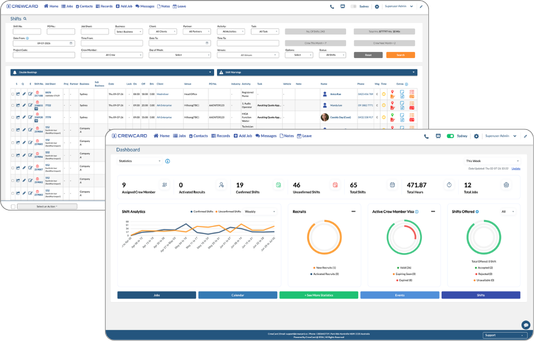
CrewCard helps businesses bring workforce operations together across recruiting, onboarding, scheduling, compliance, GPS timesheets, communication, payroll preparation and invoicing workflows.
Teams can manage worker records, availability, shifts, attendance and approved hours from one connected workforce management platform, reducing the need to move information between separate systems.
Looking for a clearer way to manage your workforce?
CrewCard connects scheduling, workforce records, compliance, timesheets, payroll preparation and other day-to-day workforce processes in one platform.
Request Demo