
How to Fill a Short-Notice Labour Hire Shift with CrewCard
Short-notice labour hire can put an operations team under immediate pressure. When a client needs workers tomorrow, CrewCard helps keep availability, scheduling, shift offers, confirmations and timesheets connected from the urgent request through to the completed shift.
A client needs workers at short notice. What do you do first?
Short-notice labour hire can put immediate pressure on an operations team. The client may need more people because of unexpected demand, absences, a new project requirement or a change to tomorrow's workload.
The challenge is not simply finding names to put on a roster. Your team needs to find suitable workers, confirm they are available, review relevant workforce information, avoid scheduling conflicts, send the shift and know who has actually accepted.
CrewCard helps bring those steps into one workforce management process so labour hire teams can respond to short-notice labour hire requirements with clearer visibility.
Why short-notice labour hire is difficult to manage manually
A last-minute staffing request creates several operational tasks at once. In short-notice labour hire, workforce information may need to be checked quickly across availability records, worker profiles, schedules, calls and messages.
Operations may need to answer all of the following before the client can be confident the shift is covered:
- Which workers are available for the requested date and time?
- Which workers have the right skills or job requirements?
- Are relevant qualifications and worker records current?
- Is anyone already booked onto another shift?
- Who has been offered the work?
- Who has accepted or declined?
- How many positions remain unfilled?
- Have confirmed workers received the correct shift information?
Labour hire businesses and host organisations also need to consider their workplace health and safety responsibilities. For general guidance, see Safe Work Australia’s labour hire guidance .
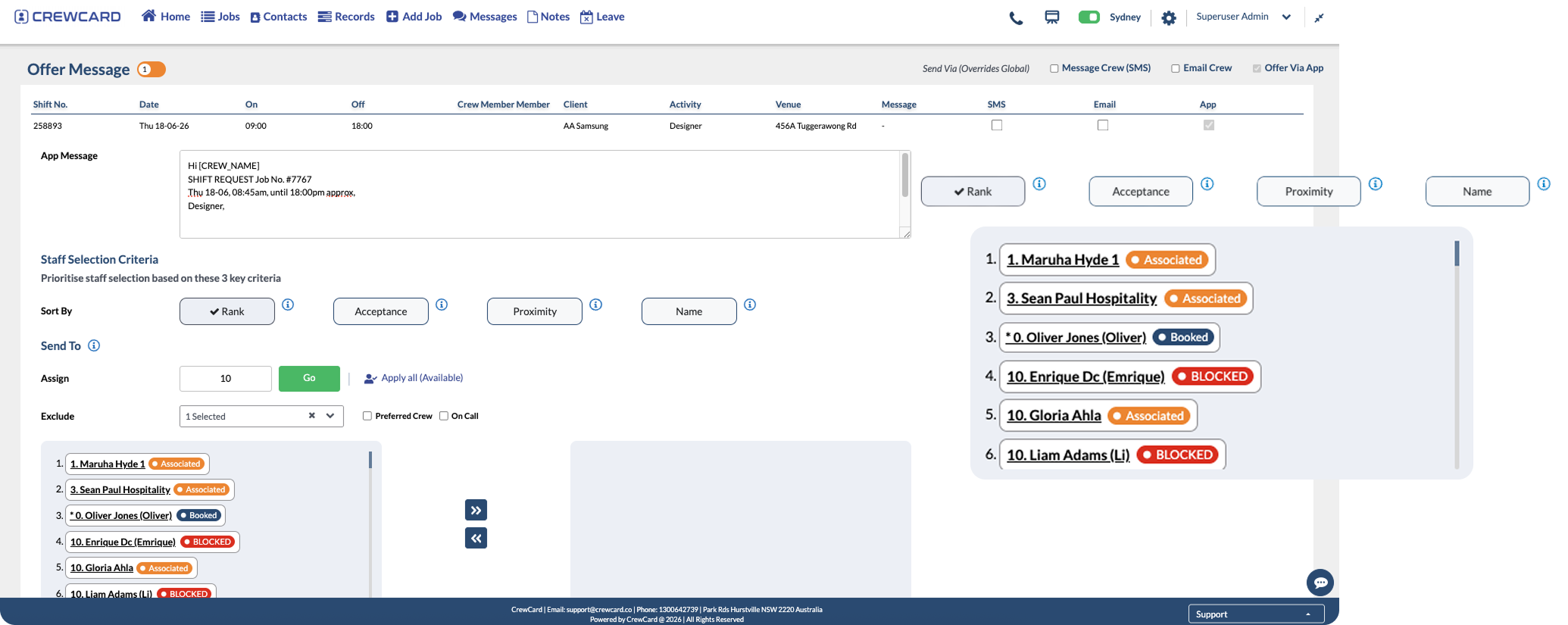
How to fill a short-notice labour hire shift with CrewCard
A connected short-notice labour hire workflow helps the operations team move from the client's request to a confirmed workforce without rebuilding the process across separate tools.
Create the job and shift requirements
Record the number of workers, date, start and finish times, location, activity, role requirements, site instructions and other important job information.
Identify available workers
Review workforce availability and identify people who may be able to work the requested shift.
Check skills and workforce requirements
Narrow the available workforce based on skills, qualifications, licences, inductions and other requirements relevant to the job.
Review existing shift commitments
Check whether suitable workers already have bookings that could create a scheduling conflict or double booking.
Send the shift to suitable workers
Offer the available work with the relevant shift information so suitable workers can review and respond.
Track responses and remaining positions
As workers accept or decline, operations can see progress toward the required crew number and focus on positions that remain unfilled.
Keep confirmed workers informed
Make sure confirmed workers can access shift times, location, meeting points, job information and operational instructions.
Track attendance and timesheets
Once the shift starts, mobile check-in and timesheet records help teams review what actually happened on the job.
Review approved hours
Worked hours can move through timesheet review and approval before supporting payroll and client invoicing workflows.
CrewCard tools for short-notice labour hire shift coverage
For short-notice labour hire, CrewCard connects the workforce information and operational tools teams need when a client requirement has to be filled quickly.
Workforce scheduling
Create jobs and shifts and manage worker assignments from one scheduling workflow.
Worker availability
Use availability information to identify workers who may be suitable for the requested shift.
Worker records
Keep skills, qualifications and important workforce information connected to worker profiles.
Shift offers
Send available work to suitable crew and keep responses connected to the scheduling process.
Mobile job information
Give workers access to important job and shift information through their mobile device.
GPS timesheets
Support attendance visibility with mobile check-in, check-out and timesheet records.
Timesheet approvals
Review worked hours and maintain clearer approved shift records.
Payroll and invoicing workflows
Keep approved workforce information connected to the processes that follow the completed shift.
What CrewCard does as the short-notice labour hire shift fills
In short-notice labour hire, the important question is no longer simply who was contacted. Operations needs to understand how close the booking is to being fully staffed and where attention is still required.
The client requirement is recorded with the shift details.
Available workers are reviewed against the job requirements.
The shift is sent to suitable workers for a response.
The requirement is filled and confirmed workers have the job details.
If only 13 of the required 20 workers have confirmed, the operations team can focus on the seven positions that still need to be filled. Once 20 suitable workers are confirmed, the short-notice labour hire workflow moves from filling the roster to preparing the confirmed crew for the shift.
Keep short-notice labour hire coverage visible
One of the biggest challenges in short-notice labour hire is knowing exactly where the requirement stands while workers are responding.
If the client needs 20 workers and 13 have confirmed, the operations team should be able to focus immediately on the seven remaining positions rather than recounting spreadsheet rows or searching through calls and messages.
Clearer visibility helps the team spend less time checking what has already happened and more time filling the remaining requirement.
Keep short-notice labour hire communication clear
Filling the roster is only part of a short-notice labour hire request. Workers also need accurate information before arriving on site.
- Shift start and finish times
- Client and job location
- Meeting point
- Role or activity
- Supervisor or contact information
- Required clothing or PPE
- Site or job instructions
Keeping this information connected to the shift reduces the need to repeatedly resend the same details through separate messages.
Once the shift starts, focus moves to attendance
The scheduling team may successfully confirm all required workers, but the operational question changes when the shift begins.
Managers now need to understand who arrived, when work started, whether shift information changed and what hours were actually worked.
CrewCard's mobile and GPS timesheet workflows help keep attendance and worked-hour information connected to the underlying shift.
What happens after a short-notice labour hire shift?
In short-notice labour hire, the client request may have been urgent, but the administration does not stop once the workers leave the site.
Worked hours may still need to be checked, adjusted where appropriate and approved before they are used for downstream processes.
- Review actual check-in and check-out activity
- Compare rostered and worked times
- Review breaks and timesheet details
- Approve completed timesheets
- Prepare approved records for payroll
- Keep clearer source information for client invoicing
Short-notice staffing needs speed and control
Filling the shift quickly is important, but speed should not come at the cost of scheduling visibility, workforce requirements or accurate timesheets. CrewCard helps keep short-notice labour hire workflows connected from the client's request through to completed and approved shift records.
Who can use CrewCard for short-notice staffing?
Short-notice labour hire and scheduling tools are useful for workforce businesses that regularly respond to changing client demand, urgent bookings or roster gaps.
- Labour hire companies
- Staffing agencies
- Event staffing businesses
- Hospitality staffing teams
- Cleaning and facilities businesses
- Security workforces
- Construction and trades labour
- Traffic management teams
- Mobile and field-service workforces
How CrewCard helps labour hire teams respond faster
CrewCard connects scheduling, worker information, shift offers, mobile job details, attendance and timesheets in one workforce management platform.
For short-notice labour hire teams dealing with urgent client requests, this means fewer disconnected steps between receiving the booking and knowing the required workforce is confirmed.
CrewCard has been developed around real labour-hire operations managing large casual workforces, where short-notice requirements, schedule changes and high-volume shift allocation are part of everyday workforce management.
Short-notice labour hire FAQs
1. What is short-notice labour hire?
Short-notice labour hire is when a client needs temporary, casual or contract workers with limited time available to fill the requirement before the shift begins.
2. How can CrewCard help fill an urgent shift?
CrewCard helps labour hire teams manage workforce information, availability, scheduling, shift offers, worker responses and timesheets through a connected workforce platform.
3. Can CrewCard help identify available workers?
CrewCard helps teams keep worker availability and scheduling information connected so operations can identify potential workers for upcoming shifts with clearer visibility.
4. Can CrewCard help prevent double bookings?
CrewCard provides visibility over scheduled shifts and worker commitments, helping scheduling teams identify potential clashes before assigning additional work.
5. Can workers receive shift details through CrewCard?
Yes. CrewCard supports mobile workforce communication so workers can access important job and shift information from their device.
6. What happens after the shift is completed?
Worked hours can move into timesheet review and approval, helping maintain clearer records for payroll and invoicing workflows.
Need to fill your next urgent labour hire shift faster?
See how CrewCard can help your operations team manage short-notice labour hire through worker availability, scheduling, shift offers, confirmations, attendance and timesheets from one platform.
Request Demo